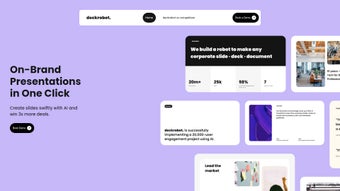

Download DeckRobot – AI‑Powered Presentation Builder, Fast, Secure & Free
Overview
DeckRobot is a cloud‑based, AI‑driven presentation builder that eliminates the manual grind of slide design. By combining natural‑language processing with a brand‑enforcement engine, the tool turns simple headlines or bullet points into polished PowerPoint, PDF, or Google Slides decks in seconds. The service runs entirely in the browser, so there is no bulky installer, no license key, and no need for periodic patching.
Users simply sign up, upload their brand assets, and let the AI handle typography, colour harmony, layout balance, and even suggest relevant graphics or charts. Because DeckRobot lives in a secure SaaS environment, every file is encrypted in transit (TLS 1.3) and at rest (AES‑256), and the platform complies with GDPR, ISO‑27001, and SOC 2 standards. Automatic updates guarantee that the latest AI models and design templates are always available without user intervention.
Whether you are a marketer crafting a client pitch, a sales leader preparing quarterly results, or a student polishing a final project, DeckRobot promises to cut slide‑creation time from half an hour to under five minutes while keeping every slide on‑brand and visually compelling. The free tier offers generous slide limits, making it accessible for freelancers and small teams, while scalable premium plans add priority processing, advanced collaboration, and API access for enterprise automation.
Key Features, Installation & Usage
- One‑Click Slide Generation: Type a headline or paste bullet points; the AI instantly produces a fully designed slide that follows your brand guidelines.
- AI Text‑Checking & Optimization: Real‑time grammar, tone, and length analysis ensures clear, concise messaging.
- Brand‑Wide Styling Engine: Upload logos, colour palettes, and icon sets once; DeckRobot applies them consistently across all new and existing slides.
- Legacy Presentation Revamp: Import .pptx files and let the AI re‑style them to match current corporate standards.
- Smart Graphic Suggestions: Context‑aware recommendations for charts, infographics, and royalty‑free images reduce reliance on external design tools.
- Collaboration & Version Control: Team members can comment, suggest edits, and revert to previous versions directly within the web UI.
- Secure Cloud Storage: Encrypted storage, GDPR compliance, and optional SSO via SAML protect your data.
- Cross‑Platform Accessibility: Works on Windows 10/11, macOS Ventura+, Linux, iOS 15+, and Android 10+ through any modern browser.
- API & Integrations: RESTful API with OAuth 2.0, ready‑made connectors for Microsoft Teams and Slack, and Swagger documentation for developers.
- Free Tier & Scalable Pricing: Start with 20 slides/month at no cost; premium plans unlock higher limits and priority AI processing.
Installation: Because DeckRobot is a SaaS solution, installation consists of a single step—creating an account. Visit deckrobot.com, click “Get Started”, verify your email, and you are ready to launch. No downloads, no admin rights, and no firewall exceptions required.
Usage Workflow: After logging in, navigate to the Dashboard, upload your brand assets, and click “New Presentation”. Enter a title, select a template style, and begin typing your content in the left panel. The AI instantly renders a visual layout on the right, which you can fine‑tune with drag‑and‑drop controls. When satisfied, hit “Export” to download a .pptx, PDF, or Google Slides file, or share a live link with teammates for real‑time collaboration.
Pros, Cons & Frequently Asked Questions
Pros
- Reduces slide creation time by up to 85 %.
- Ensures consistent brand application across all decks.
- AI‑driven content suggestions improve clarity and visual impact.
- Zero‑install, browser‑first design works on any device.
- Secure data handling with end‑to‑end encryption and compliance certifications.
- Generous free tier makes the tool accessible for solo users.
Cons
- Requires an internet connection; offline editing is not supported.
- Highly custom graphics may still need a dedicated design application.
- Premium pricing can be significant for large enterprises.
- Initial brand‑setup can be time‑consuming for complex visual identity systems.
- Exported PowerPoint files may need minor adjustments for advanced animations.
Frequently Asked Questions
Can DeckRobot import existing PowerPoint files?
Yes. Upload a .pptx file and DeckRobot will analyse each slide, replace fonts, colours, and icons to match your brand settings, and suggest layout improvements where appropriate.
What is the slide limit on the free plan?
The free tier allows up to 20 generated slides per month, which is sufficient for freelancers or occasional presenters. Premium plans raise the limit to 500 slides/month or provide unlimited generation for enterprise accounts.
Is my data safe on DeckRobot?
All data is encrypted in transit with TLS 1.3 and at rest with AES‑256. DeckRobot complies with GDPR, ISO‑27001, and SOC 2, and offers optional SSO via SAML for added access control.
Can I integrate DeckRobot with collaboration tools?
Absolutely. DeckRobot provides RESTful APIs and pre‑built connectors for Microsoft Teams, Slack, and other workflow platforms, enabling slide generation directly from chat commands or automated pipelines.
Which browsers are supported?
The platform works with the latest versions of Chrome, Microsoft Edge, Firefox, and Safari. Mobile browsers on iOS and Android are fully supported, though complex animations render more smoothly on desktop browsers.
DeckRobot delivers on its promise of rapid, brand‑consistent slide creation. The AI engine is remarkably good at interpreting bullet points and turning them into polished visuals, and the brand‑library feature guarantees every slide looks like it came from the same design studio. While the reliance on an internet connection can be limiting for field work, the overall productivity boost justifies the subscription for most professionals. The free tier is generous enough to test the platform, and the premium plans add valuable collaboration and API features. In short, DeckRobot is a solid addition to any presentation workflow.
Conclusion – Accelerate Your Presentation Process Today
If you spend more time wrestling with fonts, colours, and layout than you do crafting the story behind your slides, DeckRobot is the tool that finally lets you focus on what matters. Its AI‑driven automation, brand‑centric styling engine, and cloud‑first accessibility combine to deliver a fast, secure, and cost‑effective solution for individuals and teams alike. Start with the free plan to experience one‑click slide generation, then scale up as your organization’s needs grow. Click the button below to download DeckRobot, set up your brand profile, and watch your presentation creation time shrink dramatically.



.png)



